Two Specialized Services • One Technical Foundation

Technical
Operations
& Automation

AI Workflow Automation & Shopify E-commerce Support

Portrait of Kristine Bodoso

Backed by approximately eight years in software development

I combine practical AI workflow automation and hands-on Shopify operations with a backend development foundation—bringing structured problem-solving, systems thinking, and technical troubleshooting to both service areas.

Tech Stack

Technology used across Shopify support, workflow automation, and software development.

  • Shopify
  • Shopify Liquid
  • n8n
  • Make
  • Zapier
  • OpenAI
  • Claude
  • Google Workspace
  • Asana
  • ClickUp
  • Airtable
  • Xero
  • PHP
  • MySQL
  • MariaDB

Logos are trademarks of their respective owners. PHP logo © Colin Viebrock, used under CC BY-SA 4.0.

Services

Where I Can Help

Workflow automation and Shopify technical support built on hands-on experience in software development, systems integration, and e-commerce operations.

AI Automation

Workflow Automation

  • End-to-end workflows using n8n, Make, and Zapier
  • AI-assisted email, document, and invoice processing
  • API, webhook, branching, looping, and data-transformation logic
  • Google Workspace integrations and automated recordkeeping
  • Workflow testing, error handling, monitoring, and optimization
Shopify Support

Shopify Technical Support

  • Shopify storefront setup and responsive theme customization
  • Liquid, HTML, CSS, and JavaScript implementation
  • Product, collection, navigation, and app configuration
  • Order, fulfillment, shipping, and digital-delivery workflows
  • Store testing, technical troubleshooting, and documentation

Why Work With Me

A Technical Foundation Behind Both Tracks

Approximately seven years of backend software-development experience (PHP, AngularJS, MySQL, MariaDB) shapes how I approach Shopify support and workflow automation alike.

  • Structured problem-solving

    Years of building and debugging business systems means working through problems methodically rather than guessing.

  • Systems thinking

    Looking at how data, tools, and processes connect, not just the task directly in front of me.

  • Technical troubleshooting

    Comfortable diagnosing issues across software, workflows, and third-party integrations.

  • Workflows and business operations

    Experience supporting real business operations — internal systems, admin work, and e-commerce tasks — shapes how I support and automate them.

Selected Work

A Look at the Work

A few featured projects across both tracks. See the full list, with details on each, on the Projects page.


Animated walkthrough of an n8n invoice-processing workflow, highlighting each node from Gmail intake through AI analysis, Google Drive filing, Gmail organization, confidence review, and final logging
AI AutomationClient Work

AI-Powered Invoice Processing Automation

A client used one centralized Gmail account to receive invoices for several companies and suppliers. Preparing documents for quarterly tax filing in Germany required manually finding, downloading, identifying, renaming, and organizing every invoice—especially cumbersome when forwarded emails contained multiple attachments. I built an active n8n automation that processes every PDF attachment individually, uses Gemini to identify and extract data from invoices, and organizes valid documents across Google Drive, Gmail, and Google Sheets. Duplicate protection, confidence-based review, request-limit handling, and Google Chat error alerts make the process reliable and maintain human oversight when needed.

  • n8n
  • Gmail
  • Google Drive
  • +4

Animated walkthrough of a Make.com financial-report workflow, highlighting modules from completed Asana task detection and Xero API retrieval through CSV generation, attachment upload, and staging-range cleanup
AI AutomationCourse Project

Xero Report-to-Asana Automation

This course project addressed a client-style requirement to automatically attach a Xero financial report to an Asana task after the task was completed. The requested report was not directly available through Xero's API, so the workflow could not simply download and forward the native report. I researched the available Xero API resources, selected the Account Transactions endpoint as the closest source, and built a Make.com scenario that reconstructs the required report as a CSV. The completed file is automatically attached to the corresponding Asana task.

  • Make.com
  • Asana
  • Xero API
  • +4
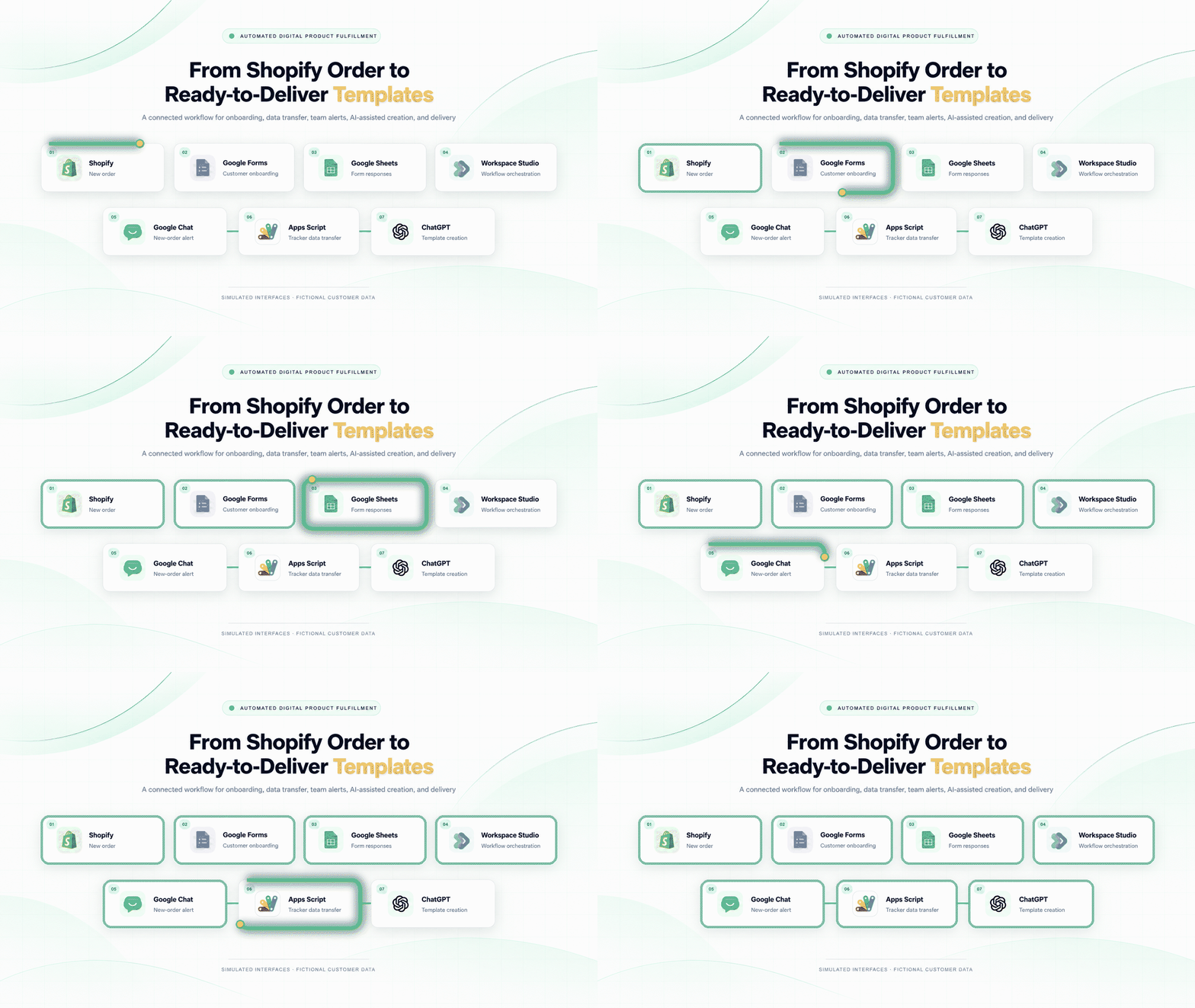
Workflow diagram connecting a Shopify order to Google Forms, Google Sheets, Workspace Studio, Google Chat, Apps Script, and ChatGPT-assisted template creation
Shopify SupportEmployer Experience

Automated Digital Product Fulfillment Workflow

Designed an end-to-end digital product fulfillment workflow connecting Shopify orders, customer onboarding through Google Forms, structured response tracking in Google Sheets, Google Workspace Studio orchestration, Google Chat alerts, Apps Script data transfer, and ChatGPT-assisted template creation and revisions. The workflow reduces duplicate data entry and keeps each order organized from intake through final delivery.

  • Shopify
  • Google Forms
  • Google Sheets
  • +5
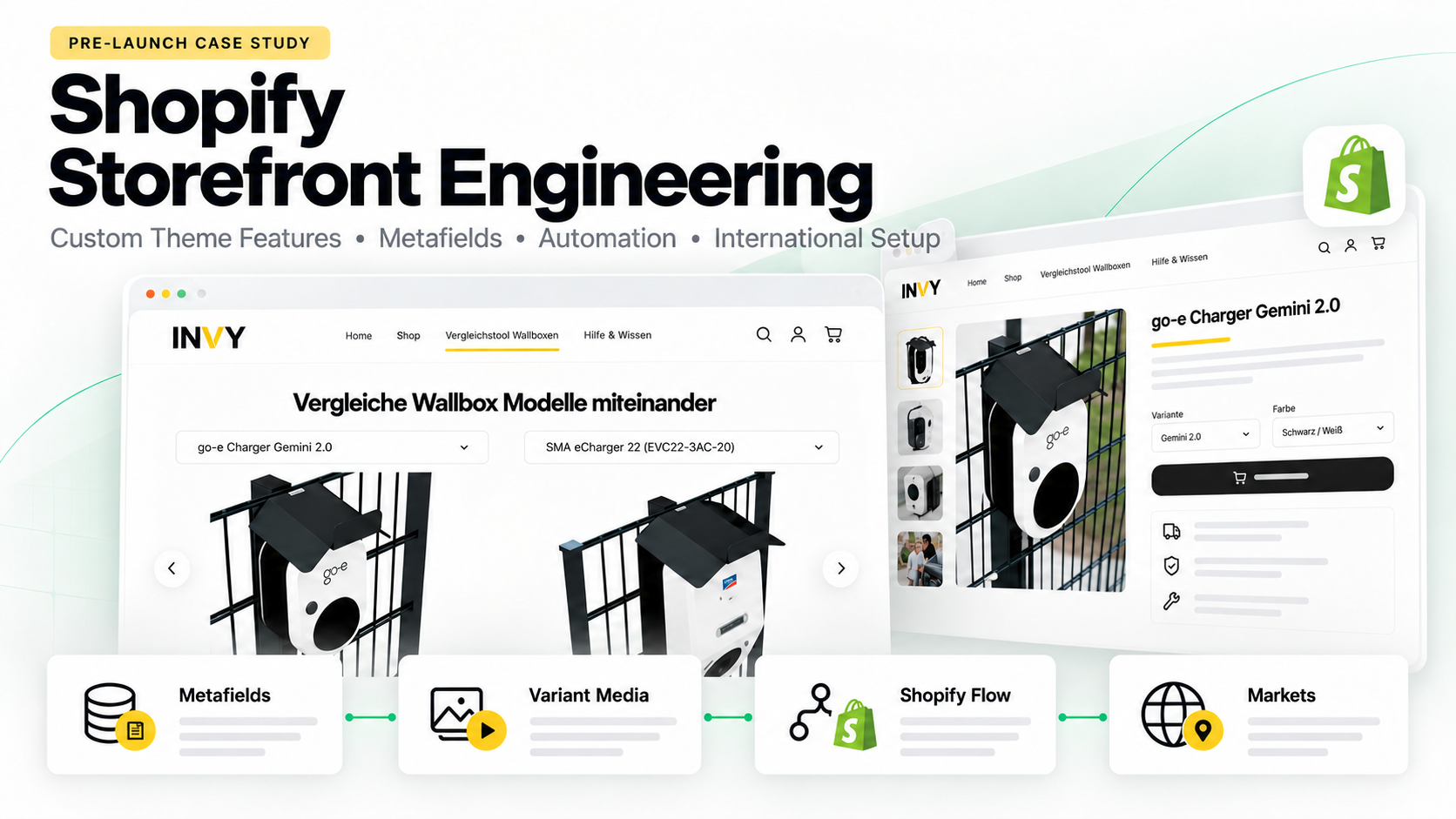
Shopify Storefront Engineering case-study cover featuring the INVY storefront, product comparison, metafields, variant media, Shopify Flow, and international markets
Shopify SupportEmployer Experience

Shopify Storefront Engineering

Pre-launch Shopify storefront engineering for Invy GmbH, covering custom Liquid and JavaScript functionality, structured product data, automated operations, reusable theme components, product merchandising, customer-review integrations, and localized European markets. I built and tested the storefront architecture, catalog workflows, service-page experiences, and merchant-editable controls documented in this case study.

  • Shopify
  • Liquid
  • JavaScript
  • +10
Animated walkthrough of an n8n invoice-processing workflow, highlighting each node from Gmail intake through AI analysis, Google Drive filing, Gmail organization, confidence review, and final logging
AI AutomationClient Work

AI-Powered Invoice Processing Automation

Project Overview

A client used one centralized Gmail account to receive invoices for several companies and suppliers. Preparing documents for quarterly tax filing in Germany required manually finding, downloading, identifying, renaming, and organizing every invoice—especially cumbersome when forwarded emails contained multiple attachments. I built an active n8n automation that processes every PDF attachment individually, uses Gemini to identify and extract data from invoices, and organizes valid documents across Google Drive, Gmail, and Google Sheets. Duplicate protection, confidence-based review, request-limit handling, and Google Chat error alerts make the process reliable and maintain human oversight when needed.

Responsibilities

  • Designed and built the complete production workflow in n8n.
  • Configured scheduled Gmail monitoring and attachment-level iteration so every PDF is processed, including multiple attachments within one email.
  • Integrated Gemini for invoice classification and structured extraction of the billed company, supplier, invoice date, total amount, and currency.
  • Created the company-code mapping, standardized filename logic, Google Drive destination rules, and duplicate-file protection.
  • Built the hierarchical Company/Biller Gmail labeling process and configured completed messages to be marked as read.
  • Added a Google Sheets monitoring log with document details, file links, processing status, and manual-review indicators.
  • Implemented confidence-based review routing, controlled wait steps for Google service limits, and Google Chat failure notifications.
  • Tested the workflow using multiple invoice formats, multi-attachment emails, duplicate documents, and PDFs that should not be classified as invoices.

Documented Workflow

  1. Every two hours, n8n checks the centralized Gmail account for qualifying messages containing PDF attachments.
  2. The workflow extracts every PDF and processes each attachment individually, including multiple files forwarded in a single email.
  3. It extracts the document text while preserving the original PDF binary for later filing.
  4. Gemini determines whether the document is an invoice and returns structured invoice data.
  5. Non-invoice documents and uncertain results are excluded from automatic filing or routed for manual review.
  6. For valid invoices, the workflow assigns the client-defined company code and generates a standardized filename and Google Drive destination.
  7. Google Drive is checked for an existing file before a non-duplicate invoice is uploaded.
  8. A monitoring row is added to Google Sheets with the processing time, company, supplier, invoice date, amount, currency, file link, status, and review requirement.
  9. The required Company/Biller Gmail labels are created or reused, applied to the source message, and the message is marked as read.
  10. Results below the required confidence level are flagged for verification of the company code, supplier name, and invoice amount.
  11. A separate error workflow sends the failed execution, affected node, and error details to a Google Chat space for investigation.

Tools & Platforms

  • n8n
  • Gmail
  • Google Drive
  • Google Sheets
  • Gemini
  • Google Chat
  • Google Workspace

This is an active client implementation. Portfolio media uses privacy-safe evidence and does not disclose credentials, private account information, execution URLs, or confidential invoice contents.

Animated walkthrough of a Make.com financial-report workflow, highlighting modules from completed Asana task detection and Xero API retrieval through CSV generation, attachment upload, and staging-range cleanup
AI AutomationCourse Project

Xero Report-to-Asana Automation

Project Overview

This course project addressed a client-style requirement to automatically attach a Xero financial report to an Asana task after the task was completed. The requested report was not directly available through Xero's API, so the workflow could not simply download and forward the native report. I researched the available Xero API resources, selected the Account Transactions endpoint as the closest source, and built a Make.com scenario that reconstructs the required report as a CSV. The completed file is automatically attached to the corresponding Asana task.

Responsibilities

  • Researched Xero's API documentation and available financial-data endpoints.
  • Identified the Account Transactions endpoint as the closest available source for the requested report.
  • Designed and configured the complete Make.com scenario.
  • Connected completed Asana tasks to the report-generation process.
  • Configured the Xero API request and mapped the returned transaction data.
  • Used a router to coordinate data preparation and final file generation.
  • Added an iterator to process individual transaction records.
  • Used Google Sheets as a temporary staging area for normalized report rows.
  • Configured the required delay to allow the transaction rows to finish populating.
  • Retrieved the completed range and converted it into CSV-formatted text.
  • Recreated the relevant structure and column order of the manually downloaded report.
  • Uploaded the generated CSV file to the corresponding Asana task.
  • Cleared the temporary Google Sheets range after the attachment was created.
  • Tested the data retrieval, formatting, attachment, and cleanup sequence in Make.com.

Documented Workflow

  1. The scenario watches Asana for tasks that have been marked complete.
  2. Make.com calls the Xero Account Transactions endpoint to retrieve the closest available transaction-level data for the requested report.
  3. A router coordinates the transaction-processing branch and the final report-generation branch.
  4. The iterator separates the API response into individual transaction records.
  5. Each normalized transaction is added to a temporary Google Sheets range using the required report structure.
  6. A short delay allows all transaction rows to be written before file generation begins.
  7. The scenario reads the populated range from Google Sheets.
  8. A text aggregator converts the prepared rows into a CSV-formatted report.
  9. The generated CSV is uploaded to the completed Asana task as an attachment.
  10. The staging range in Google Sheets is cleared so it is ready for the next report run.

Tools & Platforms

  • Make.com
  • Asana
  • Xero API
  • Google Sheets
  • Iterator
  • Router
  • Text Aggregator

Xero's API did not expose the exact report used in the original process, so the generated CSV reconstructs the required structure from the Account Transactions endpoint rather than downloading Xero's native report. This course project was developed from a client-style automation brief and was not deployed as an active client financial workflow. Any future portfolio demonstration will be clearly labeled as a simulation using fictional financial data.

Workflow diagram connecting a Shopify order to Google Forms, Google Sheets, Workspace Studio, Google Chat, Apps Script, and ChatGPT-assisted template creation
Shopify SupportEmployer Experience

Automated Digital Product Fulfillment Workflow

Project Overview

Designed an end-to-end digital product fulfillment workflow connecting Shopify orders, customer onboarding through Google Forms, structured response tracking in Google Sheets, Google Workspace Studio orchestration, Google Chat alerts, Apps Script data transfer, and ChatGPT-assisted template creation and revisions. The workflow reduces duplicate data entry and keeps each order organized from intake through final delivery.

Responsibilities

  • Designed an end-to-end workflow connecting Shopify orders with customer onboarding, production tracking, team notifications, content creation, revisions, and delivery.
  • Structured the customer onboarding form and response data captured through Google Forms and Google Sheets.
  • Configured Google Workspace Studio to coordinate the workflow across the connected Google Workspace tools.
  • Created Apps Script logic for transferring customer and order information into the working tracker.
  • Configured Google Chat notifications to alert the team when a new order entered the fulfillment process.
  • Used ChatGPT to assist with template creation and revision work based on the organized customer requirements.
  • Tested and documented the workflow with fictional customer information and privacy-safe demonstration media.

Documented Workflow

  1. A new digital-product order is received through Shopify.
  2. The customer completes the required onboarding information through Google Forms.
  3. The submitted responses are organized in Google Sheets.
  4. Google Workspace Studio coordinates the connected fulfillment steps and information flow.
  5. Google Chat sends a new-order alert to the team.
  6. Google Apps Script transfers the required customer and order data into the production tracker.
  7. ChatGPT assists with creating and revising the ordered template before final delivery through the configured customer communication process.

Tools & Platforms

  • Shopify
  • Google Forms
  • Google Sheets
  • Google Workspace Studio
  • Google Chat
  • Google Apps Script
  • ChatGPT
  • Gmail

This case study documents an employer workflow using simulated interfaces and fictional customer data. No private customer records, credentials, order identifiers, internal URLs, or confidential store information are shown.

Shopify Storefront Engineering case-study cover featuring the INVY storefront, product comparison, metafields, variant media, Shopify Flow, and international markets
Shopify SupportEmployer Experience

Shopify Storefront Engineering

Project Overview

Pre-launch Shopify storefront engineering for Invy GmbH, covering custom Liquid and JavaScript functionality, structured product data, automated operations, reusable theme components, product merchandising, customer-review integrations, and localized European markets. I built and tested the storefront architecture, catalog workflows, service-page experiences, and merchant-editable controls documented in this case study.

Responsibilities

  • Developed custom Liquid sections, blocks, snippets, and JSON templates.
  • Extended storefront functionality with JavaScript and responsive CSS.
  • Created and maintained product listings, variants, collections, metafields, and metaobjects.
  • Built product comparison, bundle-pricing, variant-media, and collection-filtering functionality.
  • Configured reusable theme components, service-page sections, and merchant-editable controls.
  • Configured Shopify Flow, Shopify Markets, domains, languages, currencies, email marketing, and review integrations.
  • Tested storefront interactions, responsive layouts, theme-editor controls, and pre-launch workflows.

Documented Workflow

  1. Defined the storefront, catalog, service-page, localization, and operational requirements.
  2. Structured product and collection data using variants, tags, metafields, and metaobjects.
  3. Developed and configured the custom storefront features and reusable theme components.
  4. Connected and configured automation, translation, email-marketing, and review applications.
  5. Tested the customer-facing experience, administrative controls, responsive behavior, and international market configuration.
  6. Prepared privacy-safe storefront and Shopify Admin evidence for the portfolio case study.

Tools & Platforms

  • Shopify
  • Liquid
  • JavaScript
  • CSS
  • JSON Templates
  • Metafields
  • Metaobjects
  • Shopify Flow
  • Shopify Markets
  • Shopify Email
  • Judge.me
  • Google Reviews
  • Hextom Translate & Currency

Feature Breakdown

Feature 01

Metafield-Driven Product Comparison

Problem

The store’s technically complex wallbox products required a clearer way for prospective customers to compare models without navigating between multiple product pages.

Solution

I built a Shopify comparison interface that allows two wallbox models to be selected independently and presents their product media, pricing, purchase links, embedded videos, and technical specifications together.

How I built it

I used structured Shopify product data and metafields instead of hard-coded comparison content. This keeps the feature scalable and allows the merchant to maintain product information through Shopify Admin without rewriting the section.

Result

The comparison experience has been implemented and prepared for launch. It enables prospective customers to evaluate two products within one interface while allowing the merchant to manage the underlying comparison information through Shopify’s product-management workflow.

INVY storefront comparison interface showing two wallbox products with independent selectors and technical information

Feature 02

Dynamic Bundle Pricing

Problem

Products could be purchased with optional accessories whose quantities affected the combined order value. The storefront needed to communicate these changing costs clearly before an item was added to the cart.

Solution

I created an interactive bundle-pricing experience that updates the displayed purchase total when the main product quantity or optional accessory selections change.

How I built it

I modified the theme’s JavaScript to listen for frontend change events from the main product quantity selector and optional accessory controls. When an input changes, the script reads the updated values, recalculates the combined bundle total, and updates the displayed price without a page reload. I used an event-driven approach so the calculation runs only when a relevant input changes and kept the complete configuration visible inside the main purchasing flow.

Result

The quantity-aware bundle flow has been implemented and tested in the pre-launch storefront. It is prepared to give prospective customers immediate pricing feedback while they configure a product-and-accessory order.

Animated INVY product page demonstrating quantity changes, accessory selection, and recalculated bundle totals

Feature 03

Variant-Specific Product Media

Problem

Products with multiple model and color combinations required different image sets. As more configurations are added, a single product could ultimately contain hundreds of media files. Loading and displaying the entire product media library on the initial page view would create an overwhelming gallery and could unnecessarily increase the amount of media the storefront needs to process.

Solution

I created a variant-specific gallery that displays only the image set assigned to the active model and color combination.

How I built it

I created and configured a variant metafield that stores the image set assigned to each product variant. In the product gallery’s Liquid code, I replaced the standard loop through the entire product.media collection with a loop through the images provided by the active variant’s metafield. I stored the image relationships at variant level rather than relying on filenames or filtering the complete media library, giving the merchant direct control through Shopify Admin.

Result

The variant-specific gallery has been implemented and tested in the pre-launch storefront. It is prepared to show prospective customers a focused set of images corresponding to their selected model and color combination, without presenting the product’s complete media library on first load.

Animated product gallery switching image sets as different wallbox models and colors are selected

Feature 04

Collection-Specific Filters

Problem

Different collections require different filtering options. Displaying every available product filter across all collections would expose irrelevant facets, make the filter interface unnecessarily long, and make it harder for prospective customers to narrow down products in a specific category.

Solution

I created collection-level configuration that hides irrelevant filter groups while allowing the remaining filters to render normally for each collection.

How I built it

I created a collection metafield containing a configurable list of facets to hide. In the collection template’s Liquid code, I check the active collection’s metafield before rendering each filter group and skip filters included in that list. I used metafields rather than hard-coded collection handles so the merchant can change facet visibility through Shopify Admin and support additional collections without adding new theme conditions.

Result

The collection-specific filtering logic has been implemented and tested in the pre-launch storefront. Each collection can present a more relevant set of filters while the merchant retains control over facet visibility through Shopify Admin.

Comparison of storefront collection filters and Shopify collection metafield rules controlling facet visibility

Feature 05

Dedicated Newsletter Page

Problem

The original newsletter popup provided limited space for presenting the offer, collecting additional customer information, and explaining how submitted information would be used. The store required a dedicated experience that could support richer content without interrupting normal storefront browsing.

Solution

I created a custom full-screen Liquid section for a standalone newsletter page with a focused signup experience and richer customer fields.

How I built it

The section supports a merchant-selected image, editable heading and introductory text, configurable colors, optional social links, and an @app block for embedding the newsletter form. I added responsive styling for a split desktop layout and full-width mobile form, plus JavaScript that sequences the form and image reveal while respecting reduced-motion preferences. I used an app block instead of hard-coding a form provider so the layout remains reusable and the form can be managed independently.

Result

The dedicated newsletter page has been implemented and tested in the pre-launch storefront. It is prepared to present the signup offer in a focused layout, support richer customer fields, and provide a responsive experience across desktop and mobile devices.

Animated transition from a newsletter popup to a dedicated branded signup page and its Shopify configuration

Feature 06

Shopify Flow Automation Suite

Problem

Several recurring store-management tasks would require manual attention: monitoring low inventory, welcoming new email subscribers, translating newly created products, and keeping product organization consistent. Handling these activities manually would become increasingly time-consuming as the catalog and customer list grow.

Solution

I configured four event-driven Shopify Flow workflows for low-stock alerts, subscriber onboarding, new-product translation, and manufacturer tagging.

How I built it

The inventory workflow checks whether a variant quantity is five or below and sends an internal email. The subscriber workflow detects new email-marketing subscriptions, applies a customer condition, and triggers a branded Shopify Email message. One product-created workflow sends selected fields to the connected translation app, while another reads the product’s Hersteller metafield and adds it as a tag. I kept each operational responsibility in a separate workflow with its own trigger, condition, and action for easier testing and maintenance.

Result

The four workflows have been configured and tested for the pre-launch store. They are prepared to support inventory awareness, subscriber onboarding, product localization, and consistent manufacturer tagging once regular store activity begins.

Animated overview of four Shopify Flow workflows and their trigger, condition, and action configurations

Feature 07

International Markets and Localization

Problem

The store was being prepared to serve customers across multiple European countries. It required country-specific languages, currencies, domains, and localized URLs without creating and maintaining a separate Shopify store for every market.

Solution

I configured a centralized Shopify Markets structure for 17 country-level markets with localized domains, language subfolders, currencies, and translated storefront content.

How I built it

I assigned the appropriate currency, domain, and language settings to each market, configured the German and international domains, created localized language subfolders, and enabled regional currency presentation including euros and British pounds. I configured the connected translation app for supported product and storefront content, then tested the market selector. I used Shopify Markets instead of separate stores so product and theme management remain centralized while each market receives an appropriate language, currency, and URL structure.

Result

The international market structure has been configured and tested for the pre-launch storefront. The store is prepared to deliver localized regional experiences across the configured European markets while maintaining a centralized Shopify catalog and theme.

Animated Shopify Markets configuration showing active European markets, localized URLs, translations, domains, and storefront selector

Feature 08

Reusable Theme Components

Problem

The theme required payment icons, shipping-provider logos, social links, service content, and localized language labels that needed to remain consistent while still being editable through Shopify’s theme editor. Hard-coding these elements into individual templates would make future updates repetitive and difficult to maintain.

Solution

I developed reusable Liquid components and merchant-editable theme blocks for footer content, service-page structures, and localized language labels.

How I built it

I created separate footer blocks for enabled payment methods, shipping-provider logos, and social icons, with schema settings for icon size, spacing, alignment, monochrome presentation, and individual shipping providers. I added responsive layout rules, reusable service and project blocks, and a language-label snippet that maps locale ISO codes to flags, codes, and native names. I separated the functionality into focused composable blocks so each component can be reused, reordered, configured, or removed without changing unrelated theme code.

Result

The reusable component system has been implemented and tested in the pre-launch theme. It is prepared to give the merchant greater control over footer content, localized language presentation, and service-page components while maintaining consistent responsive behavior.

Animated demonstration of reusable Shopify footer blocks, merchant settings, service components, and localized language interface

Feature 09

Reviews and Customer Trust

Problem

Because the storefront was still being prepared for launch, it needed a structured way to present available product and business reviews at important decision points. The system also needed to support future review collection, moderation, media uploads, and consistent branding.

Solution

I configured complementary Judge.me product-review and Google Business review experiences across product pages, collections, and the homepage.

How I built it

I installed and configured Judge.me for product reviews, moderation, verification indicators, star ratings, customer media, and review-request emails. I added its review widget to the product template and a card carousel to the homepage, then styled the widgets and emails to match the store. I connected the Google Reviews integration to the managed Business Profile and added a storefront business-rating section. I kept product-specific and business-level reviews as separate sources while using configurable app blocks rather than hard-coded review content.

Result

The review system has been configured and tested for the pre-launch storefront. It is prepared to display product and business-level social proof, collect future customer reviews, support photo and video submissions, and provide moderation controls after launch.

Animated review setup showing storefront ratings, Judge.me widgets and administration, branded emails, and Google review integration

Feature 10

Custom Electrical Installation Page

Problem

The store needed to present electrical installation services alongside its ecommerce catalog. A standard Shopify page was not sufficient for organizing multiple service categories, related project examples, detailed project information, and a clear contact path in one manageable experience.

Solution

I created a dedicated Shopify service-page experience with an introduction, service accordions, project sliders and detail modals, and a configurable contact section.

How I built it

I composed the page with a JSON template and three custom Liquid sections. The services section defines service and project block types; Liquid groups each sequence of projects under the service above it and renders each project through a reusable portfolio-card snippet. I added responsive CSS and a JavaScript custom element that initializes and refreshes the slider, responds to accordion and theme-editor events, and cleans up listeners and observers. Modeling the content as theme blocks allows services and projects to be maintained without hard-coding.

Result

The electrical installation page has been implemented and tested in the pre-launch storefront. It is prepared to present the company’s services, showcase related project examples, provide detailed project information, and direct prospective customers to the configured contact channel.

Animated custom Shopify service page showing service accordions, project cards, detail modal, theme controls, and contact section

Feature 11

Product Listings and Collection Merchandising

Problem

The pre-launch store contained a growing catalog of physical products, accessories, wallbox mounting solutions, and digital products. It required a consistent organizational and data structure so products could be assigned to the correct collections, enriched with structured information, and presented in a controlled order without manually rebuilding collection contents whenever products were added.

Solution

I created and organized the Shopify product catalog using structured listings, automated collections, curated ordering, metafields, and reusable metaobject records.

How I built it

I maintained product information, variants, media, tags, and manufacturer data; used product and collection metafields for attributes, collection configuration, and filtering logic; and used metaobjects for reusable records referenced by multiple products. I created automated collections using tags and manufacturer conditions, then reviewed selected products, arranged storefront order, and assigned collection metafields. I separated classification, structured data, and reusable content across tags, metafields, and metaobjects while retaining manual merchandising control where needed.

Result

The product catalog, structured data, and collection architecture have been configured and reviewed for the pre-launch store. The setup is prepared to keep products organized as the catalog grows while supporting reusable content, curated collection pages, and relevant collection-specific filters.


Animated Shopify catalog showing populated product listings, digital-product filtering, automated collections, merchandising order, and storefront results

This project documents a pre-launch Shopify store. The features shown were implemented, configured, and tested, but no live sales or conversion results are claimed. Sensitive URLs, email addresses, phone numbers, and other private information have been blurred or excluded.

Animated walkthrough of an n8n invoice-processing workflow, highlighting each node from Gmail intake through AI analysis, Google Drive filing, Gmail organization, confidence review, and final logging
Current production workflow shown with a slower sequential highlight across all 42 visible n8n nodes.
Animated walkthrough of a Make.com financial-report workflow, highlighting modules from completed Asana task detection and Xero API retrieval through CSV generation, attachment upload, and staging-range cleanup
Original Make.com course-project scenario shown with a sequential highlight across all 10 configured modules.
Workflow diagram connecting a Shopify order to Google Forms, Google Sheets, Workspace Studio, Google Chat, Apps Script, and ChatGPT-assisted template creation
Privacy-safe overview of the connected digital-product fulfillment workflow using simulated interfaces and fictional customer data.
Shopify Storefront Engineering case-study cover featuring the INVY storefront, product comparison, metafields, variant media, Shopify Flow, and international markets
Pre-launch Shopify storefront engineering completed for INVY.

Automated Digital Product Fulfillment Workflow Demonstration

Demonstration of the fulfillment process from Shopify order intake through onboarding, orchestration, production tracking, AI-assisted template creation, and delivery.

INVY storefront comparison interface showing two wallbox products with independent selectors and technical information
Animated INVY product page demonstrating quantity changes, accessory selection, and recalculated bundle totals
Animated product gallery switching image sets as different wallbox models and colors are selected
Comparison of storefront collection filters and Shopify collection metafield rules controlling facet visibility
Animated transition from a newsletter popup to a dedicated branded signup page and its Shopify configuration
Animated overview of four Shopify Flow workflows and their trigger, condition, and action configurations
Animated Shopify Markets configuration showing active European markets, localized URLs, translations, domains, and storefront selector
Animated demonstration of reusable Shopify footer blocks, merchant settings, service components, and localized language interface
Animated review setup showing storefront ratings, Judge.me widgets and administration, branded emails, and Google review integration
Animated custom Shopify service page showing service accordions, project cards, detail modal, theme controls, and contact section
Animated Shopify catalog showing populated product listings, digital-product filtering, automated collections, merchandising order, and storefront results

Let’s Talk About Your Automation or Shopify Support Needs

Whether it’s hands-on Shopify support or a workflow worth automating, I’m happy to talk through what you need.